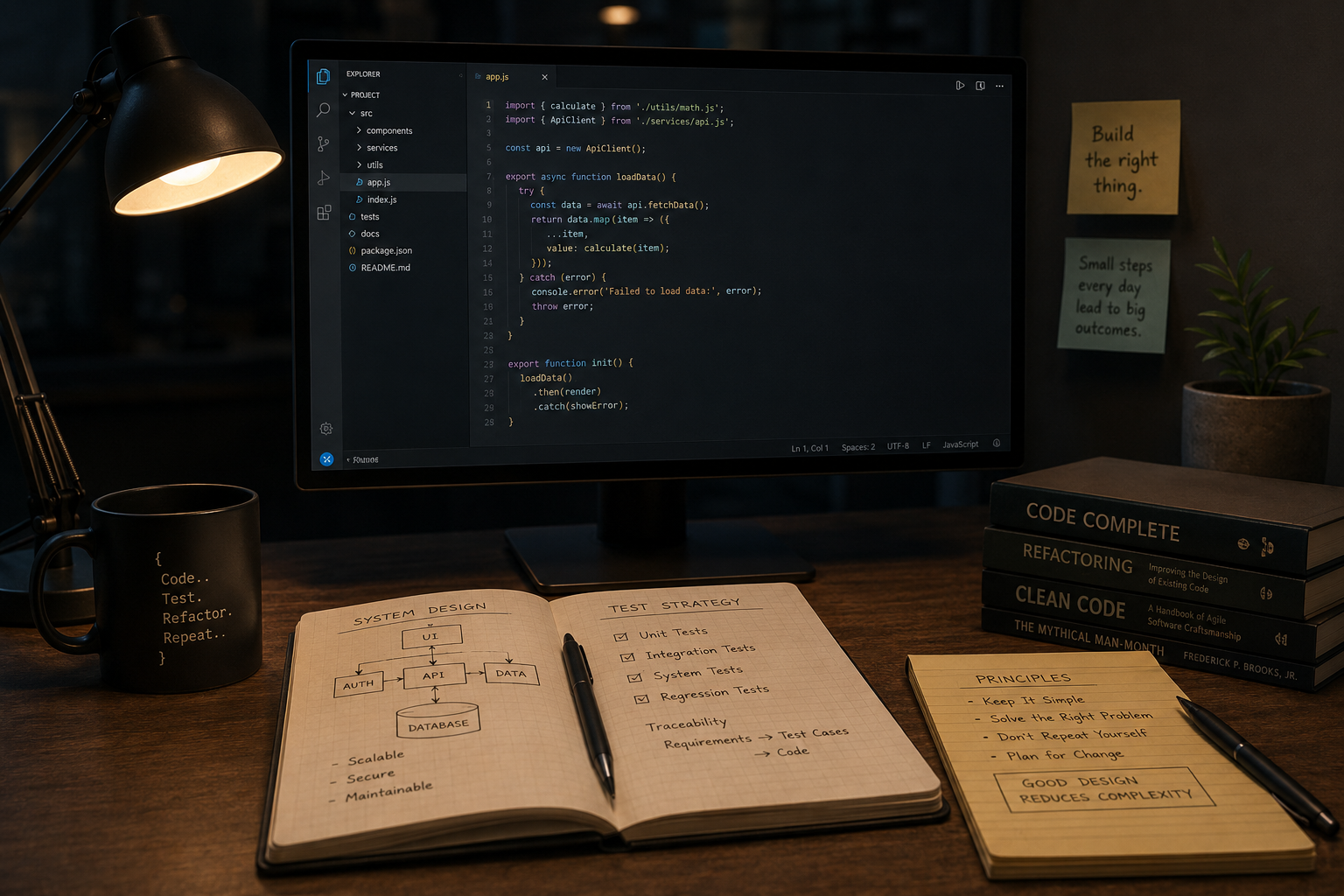
What is Software Engineering and Why Does It Matter?
Let’s start by clarifying what software engineering entails. It is a systematic and disciplined approach to designing, developing, and maintaining software systems. This involves a combination of science, mathematics, and engineering principles to produce high-quality software that meets user needs efficiently and reliably.
Software engineering matters because software development is a complex undertaking that involves multiple stages and stakeholders. Without a structured approach, projects can easily spiral out of control, resulting in cost overruns, missed deadlines, and subpar software. This is where software engineering processes come into play. It provides a framework for managing the entire software development lifecycle, ensuring that projects are completed successfully and meet the desired objectives.
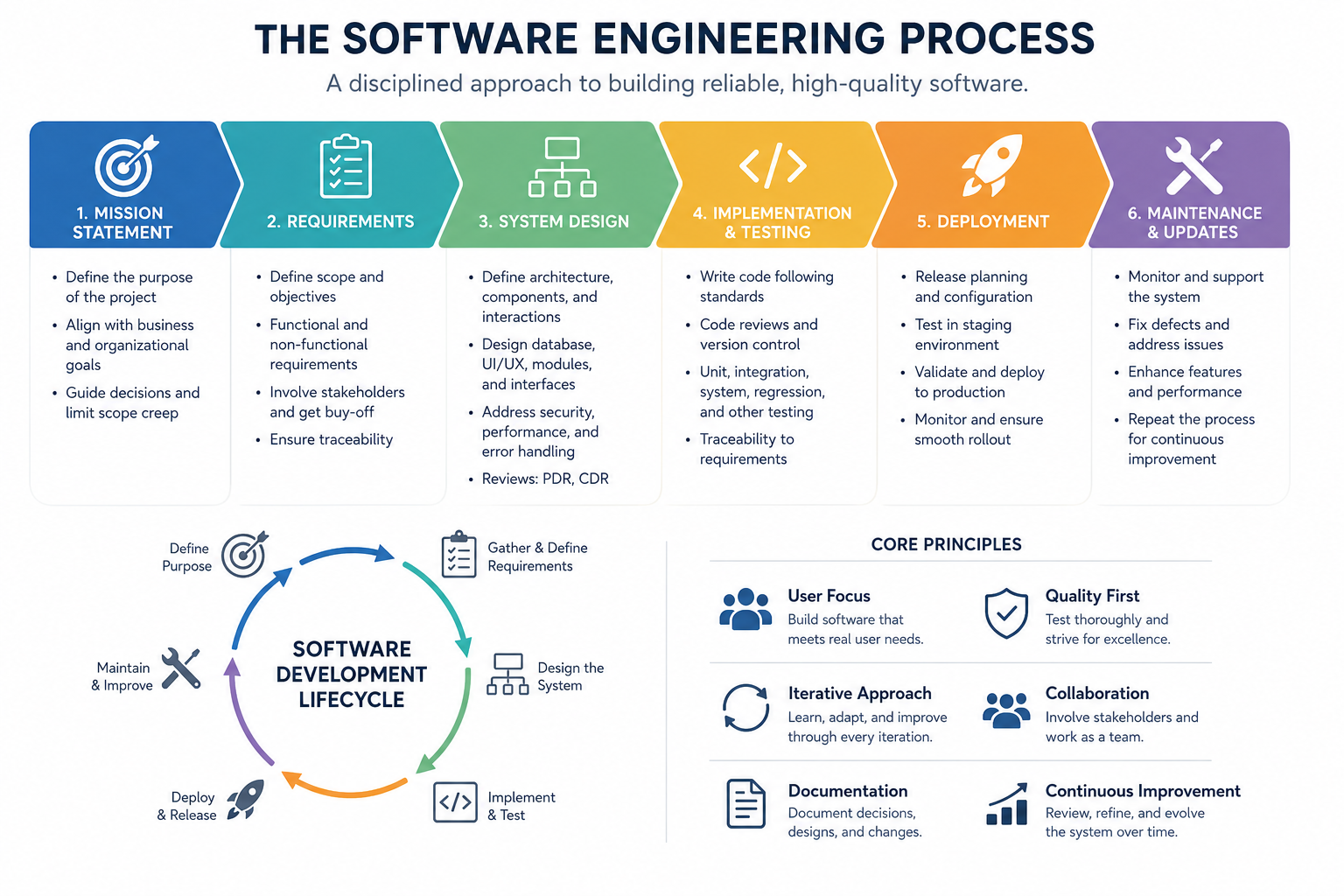
Principal Phases of the Software Engineering Process
- Mission Statement: Describes succinctly the purpose of the project. This will inform the stakeholders where this project is going and why they should care.
- Requirements: Requirements are the foundation of a project. It defines the scope of the project. It should be specific enough to inform the phases that follow.
- System Design: In this phase, architects and designers create a blueprint of the software, outlining its structure, components, and how they will interact.
- Implementation and Testing: Implementation and testing are an iterative process. During implementation, developers write the code based on the design specifications. This is where the project begins to take its intended form. There are different levels of testing that can occur during the development process. These include unit, integration, system and regression level testing, among others. One of the key concepts of testing is that it should tie back to requirements.
- Deployment: Deployment is a crucial phase as it’s the point where the rubber meets the road. This can only happen when the product has been certified based on testing that ties back to the requirements.
- Maintenance and Updates: Maintenance and updates follow the normal development process. None of the steps are skipped.
Mission Statement
“Why are we undertaking this project?” That’s the question that a mission statement should be answering. It should guide the developers throughout the development process. It should articulate the core objectives. It should also help reign in scope and feature creep.
A well-crafted mission statement will align the project with the broader business and organizational objectives of the company. Once the team has a mission statement, it will serve as a reference point for decision making. It can also help prioritize features and functionality that are in line with the stated goal.
While it is meant to set limits on scope, it should be flexible to the necessities of implementation. The team should not be hemmed in by a mission statement that is overly specific. Don’t include language that stifles creativity and forward thinking.
This statement shouldn’t need to be updated frequently. However, it shouldn’t be etched in stone. Like all parts of the engineering process, it needs to accommodate changes in a dynamic environment. If the mission statement is updated, this will ripple downstream to phases that follow and reflect the updates.
Requirements
Requirements provide clarity to all the stakeholders involved in the development process regarding what will be built and delivered. Everyone must have a common understanding of what is being proposed.
This will define the scope of the project in specific terms. The generality of the mission statement becomes much more concrete in this phase of the project. However, specifics of implementation are to be avoided at this point. The rule is this: If there are externalities that the software must adhere to, put it in the requirements. This includes specifications for protocols, file formats, interfaces, and other such externalities that the software is expected to adhere to. If these specifications are not imposed on the project but are decisions of implementation, do not make it a requirement. Such decisions are best made during the design phases.
It’s important to distinguish between functional and non-functional requirements.
Functional
Functional requirements describe what the software should do. They outline specific functions and features of the software.
Non-functional
Non-functional requirements specify performance rather than function. These include such metrics as responsiveness, security, stability, usability, compliance and other such measurable or conceptual factors.
This distinction between functional and non-functional requirements is important as they will be handled differently during testing.
How To Form Requirements
The requirements, both functional and non-functional, are affirmative statements and not wishes or hopes. This is the time to determine what’s needed and what isn’t. They are also not negative statements. Don’t assert what the software will not do.
Stakeholders
Identify the stakeholders and solicit their participation in preparing the requirements. This can include end-users, customers, managers, developers and anyone else that has an interest in the project.
Candidate Requirements
The candidate requirements will come in many different forms. It’s the job of the engineer to properly form these submissions.
A preliminary set of requirements will be compiled. This set will contain duplicates. It will have gaps. It will be inconsistent and contradictory. All these flaws will need to be rooted out and eliminated. This will be a painstaking and iterative effort and involve review from the stakeholders.
Documentation
The eventual list will need to be formed into a document. This can come in variety of forms. Key features of the document will be that it has force within the organization and is version controlled. There are numerous tools available for this purpose. The use of such tools is optional.
Buy-Off
Get the buy-off of the stakeholders once the list is complete. Buy-off ensures that everyone involved is on the same page and that there are no lingering issues.
Allowing for Traceability
Whatever method is used to document the requirements, be sure that individual requirements are traceable. This will become important when tying requirements to the design and testing phase of the project.
System Design
The primary goal of system design is to translate the high-level requirements gathered from stakeholders into detailed technical specifications that developers can work with.
During this phase, the system's overall architecture is designed, including the structure of components, modules, and their interactions. It defines how different parts of the system will work together.
Architecture
System architecture documentation provides a comprehensive and organized overview of the system's structure, design, and components. It serves as a common language for stakeholders, including developers, testers, project managers, and business stakeholders. It also guides the development team in implementing the system according to the specified design, ensuring consistency and adherence to basic principles.
Additionally, the architecture aids in the maintenance and evolution of the system over time, allowing developers to understand the system's inner workings and make informed modifications.
When addressing issues or defects, architecture documentation can help identify the root causes and provide insights into potential solutions.
The system architecture is usually documented through diagrams coupled with a narrative.
Database
Effective database design ensures that data is organized, structured, and stored in a way that facilitates efficient retrieval and manipulation. It should be properly designed to enforce data integrity rules, preventing the storage of inconsistent or incorrect data. It should also be optimized to ensure efficient data retrieval and query performance, leading to faster response times and improved user experience. A good database design allows for scalability, enabling the system to handle growing data volumes and user loads.
Entity-Relationship Diagrams (ERD)
ERDs are graphical representations of the database schema. They illustrate entities (tables), attributes (columns), and the relationships between entities.
Data Dictionary
This provides a detailed description of each table, including the names and descriptions of attributes, data types, constraints (e.g., primary keys, foreign keys), and any additional notes or comments.
Schema Diagrams
These diagrams show the relationships between tables, including the foreign keys that link tables together. These diagrams help visualize the database's structure and dependencies graphically.
Data Flow Diagrams (DFD)
Use DFDs to illustrate how data flows within the system and between databases if multiple databases are involved. This can be particularly useful for systems with complex data integration.
User Interface
A well-designed UI contributes to a positive user experience by making the software intuitive, user-friendly, and visually appealing. An efficient and well-organized design can help users perform tasks quickly and with minimal effort. It should be visually appealing, engaging and allow them to benefit fully from the product. Consistency across an application or product ensures that users can easily navigate and understand different parts of the software.
When designing a UI, there should be consideration given to consulting with an expert in this field.
Look and Feel
Establish a consistent look to the UI early on. Be certain to maintain consistent flows so that the user will not be caught off guard by an unexpected UI flow. Careful consideration should be given to color schemes, styles, and fonts.
Wireframe
Wireframe diagrams can be used to quickly layout screens without regard to the look and feel of the application. Styling can be merged with the layout at implementation.
Use Case
Use case scenarios help developers understand how users interact with a system or application. They provide insights into user goals, actions, and workflows, which are essential for creating intuitive and user-friendly interfaces.
Use cases are descriptions of how users interact with a system to achieve specific goals or tasks. They outline the steps a user takes, the system's responses, and any variations that may occur during the process. Use cases focus on the user's perspective and help identify the different paths a user can follow within an application.
When designing a use case, it’s important to understand the goals and objectives users have when using the application.
User Flow Diagrams
User flow diagrams are similar in many ways to use cases. This is a graphical representation of the use case scenario. These diagrams can give insight into the flow through the system that a narrative does not afford. However, while it provides clarity in the workflow, it also suffers from a lack of detail.
Module Design
Modules enhance modularity, which means breaking down a complex system into smaller, more manageable parts. This simplifies the development, testing, and maintenance processes. Well-designed modules can be reused in various parts of the application or other projects, which saves time and effort. When modules have well-defined boundaries, it becomes easier to maintain them because changes or bug fixes can be isolated to specific components without affecting the entire system. Modular designs enable scalability by allowing the addition or replacement of modules to accommodate new features or changing requirements. Moreover, modular systems foster teamwork as developers can work independently on individual modules.
High Cohesion
Modules should have high cohesion, meaning that the elements within a module should be closely related and work together to achieve a specific function. This reduces complexity and makes modules easier to understand.
Low Coupling
Modules should have low coupling, meaning they should be loosely interconnected with other modules. Low coupling reduces dependencies and allows for changes in one module without affecting others.
Encapsulation
Encapsulation involves hiding the internal details of a module and exposing only a well-defined interface. This protects the module's internal logic and ensures that it can be used correctly by other parts of the software.
Single Responsibility Principle (SRP)
Each module should have a single, well-defined responsibility or function. This promotes clarity and maintainability.
Steps to Designing Modules
Identify modular components: Break down the software into components that can be encapsulated and developed independently.
Assign the modules functional responsibilities: Clearly defined responsibilities ensure that the modules have clear and well-defined purposes.
Define the interface: The interface defines how other modules will interact with it. The interface defines and encapsulates the module.
Identify interdependencies: Reducing interdependencies is key to attaining low coupling. Low coupling reduces complexity and mitigates risk.
Identify data flows: Managing the flow of data fosters a clear understanding of the module’s purpose and helps maintain encapsulation.
Develop a Unit Test Plan (UTP): A UTP will allow the module to be independently validated. A UTP can include code specifically designed to exercise the module fully.
Security
Incorporating security into your application's design is vital. It shields sensitive data, minimizing the risk of unauthorized access, breaches, or data leaks. Moreover, it aids in risk mitigation by allowing early identification and mitigation of security threats, reducing the likelihood of costly post-production fixes. Complying with legal and industry-specific security requirements and regulations is crucial to prevent legal consequences and protect your reputation. Furthermore, robust security measures foster user trust, encouraging more individuals to use your application and share their data securely. Emphasizing security during the design phase is cost-effective, as addressing security issues after deployment can be considerably more expensive and disruptive.
Consider enlisting the services of a security expert at this phase. It’s imperative to get this right.
Performance
Considering performance during the design phase of a project is crucial to ensure that the resulting software operates efficiently, meets user expectations, and minimizes the need for costly optimizations later.
Key Factors
Requirements: Refer often to the performance criteria from the requirements documentation.
Scalability and Load Balancing: Design your system to be scalable to handle increased loads. Implement load balancing strategies to distribute traffic evenly across multiple servers or instances.
Data Management: Optimize data access and storage to minimize unnecessary queries. Choose appropriate data structures to reduce query times and data redundancy.
Caching: Utilize modern caching mechanisms at both the system and software levels to reduce the need for time-intensive read/write operations.
Network Overhead: Network access can be a bottleneck in many applications. Be mindful of how data is being passed over the network to reduce redundant and superfluous traffic.
Asynchronous Processing: Design the application to perform time-consuming tasks asynchronously to avoid blocking the main application thread. Use background jobs and queues for tasks like email sending or batch processing.
Coding Practices: Emphasize clean and efficient code practices. Avoid unnecessary loops, recursion, or nested queries. Profile and optimize critical code sections.
Documentation: Documenting your performance can provide valuable information about how changes are influencing performance.
Error Handling and Recovery
When designing a software application, it's important to consider error handling and recovery strategies right from the start. The first step involves identifying potential errors and exceptional scenarios that may occur during the software's execution, encompassing both technical issues like server crashes and user-related errors such as incorrect input. To manage these issues, a comprehensive error logging and monitoring system should be designed to record relevant error information, including timestamps, error messages, user actions, and context, with tools for efficient monitoring and analysis.
Craft clear and user-friendly error messages to offer meaningful insights into what went wrong and, when possible, suggest how users can resolve the issue without revealing intricate technical details. Ensure resilience by planning for graceful degradation during system failures.
For data integrity, establish procedures to roll back transactions during database operations if an error arises during multi-step processes. Handling external dependencies, such as third-party APIs, involves implementing timeout mechanisms and retries to manage communication errors effectively.
Security considerations should be paramount, ensuring that error handling doesn't inadvertently expose sensitive information to potential attackers.
Create test cases to simulate error scenarios and validate the software's appropriate response. Document error-handling and recovery procedures, including how various error codes or types are handled, and maintain this documentation throughout the project's lifecycle for reference. Assess scalability and load considerations to ensure that error logs and recovery procedures can handle increased user loads without becoming performance bottlenecks.
Finally, establish a process for continuous improvement of error handling based on real-world incidents and user feedback, regularly reviewing and refining error-handling strategies to enhance software reliability.
Preliminary Design Review (PDR)
The PDR serves an important role in the development process. Its primary goal is to ensure that the design direction is correct before investing heavily in the design work. Ideally, it should take place after the requirements phase is fully completed and early into the design phase. By this point, the system's architecture should be mostly finalized.
During the PDR, it's essential to involve stakeholders and carefully consider their feedback. This input is invaluable as it helps guide the project in the right direction. The PDR represents a significant milestone in the development process.
It's worth noting that minor issues with the design discovered during the PDR should not significantly hinder development progress. However, if major issues surface during this review, it may be necessary to reevaluate and potentially make significant adjustments to the project's course. In essence, the PDR acts as a checkpoint to ensure that the project is proceeding on the right path and to catch any major issues early to prevent costly revisions later in the development process.
Critical Design Review (CDR)
The CDR serves an important role in the development process, aiming to confirm the soundness of the design. It should take place after the design phase has been fully executed and just before the implementation phase begins. During the CDR, stakeholders' active involvement is required, and their feedback must be thoroughly addressed before proceeding with the actual implementation.
Consider the CDR as a significant milestone within the development process. It serves as a checkpoint where all design-related issues must be resolved before the CDR can be deemed complete. This comprehensive review ensures that the design is robust and well-founded, laying a solid foundation for the subsequent implementation phase.
Implementation
During implementation, the code base for the final product begins to take shape.
Coding Standards
Establish coding standards to ensure consistency, readability, and maintainability of the codebase. Consistent coding conventions make it easier for multiple developers to work on the same project.
Version Control
Version control systems are used to track code changes, collaborate with other developers, and ensure code integrity. Developers commit code regularly to a shared repository.
Code Reviews
Code reviews involve peers or senior developers reviewing each other's code to identify issues, ensure adherence to coding standards, and exchange knowledge. Code reviews enhance code quality and identify potential problems early.
One important factor in code reviews is that it discourages laziness during implementation. It becomes much harder for a developer to justify writing sloppy code if they know they will be called out on it later.
Unit Testing
Unit testing during implementation benefits the developer by providing feedback early on about the quality of their code.
Inline Documentation
Inline code documentation, including complex logic, function descriptions and usage guidelines, can be helpful in a team environment. When another developer is required to utilize or fix someone else’s code, they should be afforded the benefit of the thinking that went into the original implementation.
Tools
The selection of development tools should be done at the team level and adoption should be mandatory. Things like code editing can be problematic if tabs and other factors are not consistent across the team.
Testing
Software testing encompasses various types, including unit testing, integration testing, system testing, acceptance testing, performance testing, security testing, and more. Each type serves a specific purpose and focuses on different aspects of the software.
Test Planning
Test planning involves defining testing objectives, selecting appropriate testing methods, and creating a test plan that outlines the scope, schedule, and resources required for testing. The test plan aligns with project requirements and objectives.
Test cases are detailed scenarios or scripts that describe specific inputs, expected outputs, and the steps to be followed during testing. Test cases are designed to cover various use cases and requirements. During the execution phase, testers run test cases and scenarios to evaluate the software's behavior. Test data is provided to simulate real-world conditions and user interactions. Testers document the results, including any defects or deviations from expected behavior.
When defects or issues are identified during testing, testers report them, including details of the problem, steps to reproduce it, and its severity. This information helps developers understand and resolve the issues.
Traceability is the practice of linking test cases to specific requirements. It ensures that each requirement is tested, and the test results can be traced back to the original requirements.
Types of Testing
Unit Testing
Unit testing focuses on verifying the correctness of individual units or components of the software in isolation. Developers write unit tests for functions, classes, or modules to ensure they produce the expected output for given inputs. Automated testing frameworks are commonly used for unit testing.
Integration Testing
Integration testing assesses the interactions between different components or modules of the software. It ensures that these components work together correctly when integrated. Integration tests identify issues that may arise during the integration process.
Functional Testing
Functional testing evaluates the software's functionality by testing it against predefined functional requirements. Test cases are designed to simulate real-world usage scenarios and validate that the software behaves correctly, performs essential functions, and responds appropriately to user inputs.
Regression Testing
Regression testing is conducted whenever code changes are made to ensure that new modifications do not introduce new defects or negatively impact existing functionality. It helps maintain the software's stability as it evolves. The code changes should be evaluated for their impact on the wider project and ensure that appropriate levels of regression testing are performed.
Performance Testing
Performance testing assesses the software's responsiveness, scalability, and resource utilization under various conditions. It identifies performance bottlenecks and helps optimize the software for efficiency.
Security Testing
Security testing checks the software for vulnerabilities and potential security breaches. It includes assessments of authentication, authorization, data encryption, and protection against common security threats.
Usability Testing
Usability testing evaluates the user interface and overall user experience. It identifies areas where improvements are needed to enhance user satisfaction and ease of use.
Acceptance Testing
Acceptance testing is used to release the software. A series of tests are performed to determine if the software is ready for release. If the software does not pass on every metric, the software must be updated, and the acceptance test must be rerun. Acceptance testing can pull from any of the previous testing types to achieve its goal.
Deployment
Software deployment is a complex issue that we will only touch on here. It is highly specific to the application and can range from uploading an executable to complicated, multi-server deployments.
Deployment planning starts early in the software development process. The release plan outlines the scope of the deployment, including which features or enhancements will be included in the release. The plan must ensure that all configurations, such as environment-specific settings, database connection strings, and third-party integrations, are correctly configured for the production environment.
Before deploying to a production environment, the software is typically deployed to a staging or pre-production environment. This environment closely resembles the production environment and allows for final testing and validation. Testers verify that the software works correctly and aligns with the intended requirements.
Final Thoughts
Agile Methodology
Agile is the main competing methodology to this traditional approach. While Agile has many similarities to traditional software engineering, the differences are significant.
Documentation and Formal Reviews
Agile methodologies often favor working software over comprehensive documentation. Traditional methods, however, place a significant emphasis on detailed documentation, architectural design, and formal design reviews (PDR and CDR).
Scope and Flexibility
While Agile methodologies are highly adaptive to changing requirements even late in the development process, traditional methods suggest a more structured approach to defining and adhering to requirements and scope. It should be noted that traditional methods can also accommodate late changes to the requirements. There is always a trade-off between rapid implementation and thorough analysis when changes to scope are required.
Development Cycles
Agile methodologies use time-boxed sprints or iterations, typically lasting a few weeks, to create a rhythm of planning, development, and delivery. Traditional methods are much more linear.
Software Tools
The use of software tools and integrated development environments is a given. Such tool usage should be standardized across the team. Standardization will encourage consistency in the products developed. These tools include IDEs, code editors, project builders, collaboration tools, database managers, bug trackers, and performance monitors.
Effective use of these software tools and development environments is important for enhancing productivity, code quality, collaboration, and the overall software development process. Developers often choose tools based on project requirements, technology stack, and personal preferences, tailoring their toolset to meet specific project needs.
Emerging Technologies
The use of emerging technologies is important to touch on. AI is becoming a vital part of the development process and is highly encouraged. While these technologies are groundbreaking, they have limitations that must be acknowledged. Overreliance can lead to developers not understanding the code that’s been written.
Conclusion
Successful software engineering is predicated on a structured approach, integrating key principles for efficient, reliable software that meets user needs. The lifecycle involves several phases: defining a clear mission statement, detailed requirements gathering, systematic system design, and iterative implementation and testing. Regular design reviews like PDR, CDR, and code reviews ensure alignment with project goals. This disciplined methodology fosters the delivery of high-quality software, catering to an evolving and demanding marketplace of complex software products.